Mastering Glowing Eyes in Procreate
Digital illustration has evolved far beyond simple sketching. Today, artists are expected to create immersive worlds, compelling characters, and atmospheric scenes that grab attention instantly. One of the most powerful tools for achieving this level of engagement is the strategic use of lighting effects, particularly within character design. This is where Glowing Eyes becomes an indispensable asset for any serious digital artist working within the Apple ecosystem.
These specialized brushes are not merely decorative stamps; they are precision-engineered tools designed to add depth, mystery, and supernatural flair to your artwork. Whether you are illustrating a fantasy novel cover, designing concept art for a video game, or creating social media content that needs to pop, understanding how to leverage these specific assets can significantly elevate your final output.
Why Specialized Eye Brushes Matter
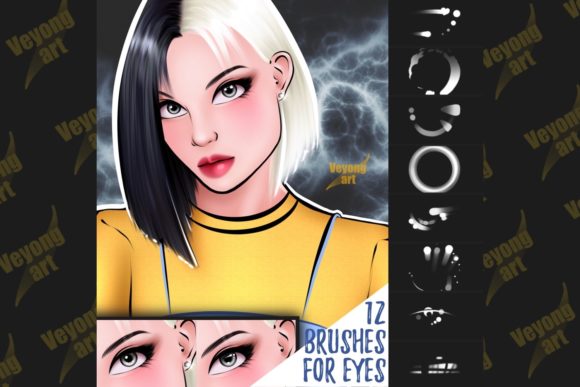
In traditional painting, capturing the luminescence of an eye requires complex layering of glazes, careful control of opacity, and a deep understanding of light physics. In digital art, while the principles remain the same, the workflow can be streamlined without sacrificing quality. The Glowing Eyes collection offers twelve distinct brush stamps that replicate this intricate process in seconds.
The primary advantage here is consistency and speed. For professionals working under tight deadlines, such as freelance illustrators or marketing agencies producing rapid content, the ability to drop in a high-quality, pre-rendered eye effect is a massive productivity booster. It allows you to focus on composition and storytelling rather than getting bogged down in the minutiae of pixel-perfect iris detailing.
However, it is crucial to note a significant technical limitation: these brushes are exclusively compatible with Procreate. They are not suitable for other programs like Photoshop, Clip Studio Paint, or Affinity Designer. This specificity ensures that the brush dynamics, texture, and blending modes work perfectly within Procreate’s engine, but it also means you must be committed to this specific platform to utilize them effectively.
Key Characteristics and Artistic Strengths
What sets this particular set apart from generic stamp brushes is the attention to atmospheric detail. Each of the twelve designs varies in intensity, shape, and color distribution. Some mimic the sharp, predatory glow of a nocturnal hunter, while others offer a softer, ethereal radiance suitable for celestial or magical beings.
- Versatile Aesthetics: The range covers various genres, from cyberpunk neon hues to organic, mystical greens and blues.
- Layer-Ready Design: These stamps are optimized to work seamlessly with Procreate’s blending modes, such as Add, Screen, or Color Dodge, allowing for natural integration into existing shadows and highlights.
- High Resolution: As a digital file, the source assets maintain clarity even when scaled, ensuring crisp edges and smooth gradients.
The "glow" effect is not just a flat color overlay. It includes subtle variations in brightness that mimic real light dispersion. This realism is what separates amateur-looking edits from professional-grade illustrations. When you apply these stamps, they interact with the underlying layers in a way that feels organic, provided you adjust the opacity and blending settings correctly.
Practical Applications Across Industries
The utility of Glowing Eyes extends beyond hobbyist drawing. Here is how different professionals can integrate these tools into their workflows:
Concept Art and Game Design
Character designers often need to quickly iterate on enemy types or magical creatures. Using these brushes allows for rapid prototyping. You can test how a demon looks with red glowing eyes versus a ghostly blue, helping stakeholders visualize the threat level or alignment of a character without spending hours rendering each variant.
Book Cover Illustration
In the publishing world, especially within fantasy and sci-fi genres, eye contact on a cover is a proven driver of sales. A pair of intense, glowing eyes can convey emotion and plot hints instantly. Authors and self-publishers can use these stamps to create striking cover art that stands out in thumbnail views on online marketplaces.
Social Media and Branding
Marketers and content creators know that eyes draw attention. If you are creating branded mascots or animated stickers for platforms like Instagram or TikTok, adding a subtle glow can make your characters feel more alive and engaging. It adds a layer of polish that suggests high production value, enhancing brand perception.
Educational Content
Educators teaching digital art can use these brushes to demonstrate the importance of focal points. By showing students how a simple glow effect can guide the viewer’s eye to the most important part of an image, teachers can explain complex compositional theories through practical, hands-on examples.
Maximizing Usability and Efficiency
To get the most out of this digital file, consider your workflow. Since these are stamps, they are best used as a base. Do not simply drop them in and leave them. Adjust the hue to match your scene’s lighting temperature. If your scene is lit by a warm fire, a cold blue glow might look disjointed unless intentionally styled as a magical contrast.
Furthermore, experiment with layer masks. Instead of erasing parts of the eye stamp, use a mask to fade the glow into the surrounding fur, skin, or scales. This technique creates a more believable transition between the light source and the character’s anatomy. Remember, the goal is integration, not just addition.
For entrepreneurs and freelancers, time is money. By reducing the time spent on repetitive details, you can take on more clients or dedicate more energy to unique aspects of each project. This efficiency gain is a tangible return on investment for any creative business.
Important Considerations for Buyers
Before purchasing or downloading, ensure you are working within the Procreate environment. As stated, these files will not function in other software. This is a common point of confusion for users who switch between multiple digital art applications. Verify your device compatibility as well, as Procreate is exclusive to iPadOS.
Additionally, consider the style of your existing portfolio. If your work is strictly realistic human portraiture, these stylized glowing effects may have limited use. However, if you dabble in fantasy, horror, sci-fi, or stylized cartooning, these brushes are likely to become a staple in your toolkit.
Ultimately, Glowing Eyes represents a smart investment in your digital asset library. It bridges the gap between technical skill and artistic vision, allowing you to produce high-impact visuals with greater ease. By understanding its limitations and leveraging its strengths, you can enhance your creative output and engage your audience more effectively.