Mastering Digital Illustration with the 131 Ribbon and Outline Procreate Bundle
In the rapidly evolving world of digital art, efficiency is just as critical as creativity. Artists are constantly searching for tools that streamline their workflow without sacrificing quality or artistic integrity. For iPad users relying on the powerful Procreate application, finding the right brush sets can transform a tedious illustration process into a fluid, enjoyable experience. This is where specialized collections like the 131 Ribbon and Outline Procreate Bundle become indispensable assets for illustrators, graphic designers, and hobbyists alike.
This comprehensive collection is not merely a random assortment of digital stamps; it is a curated toolkit designed to address specific aesthetic needs. By combining intricate ribbon designs with versatile outline tools, this bundle offers a unique solution for artists who want to add decorative flair and clean structural elements to their work. With a total of 131 brushes and stamps, the package provides immense value, especially considering the current offer of 20% off the original price for Procreate sets.
Breaking Down the Toolkit: What You Actually Get
Understanding the composition of a digital asset pack is crucial before integrating it into your library. The 131 Ribbon and Outline Procreate Bundle is divided into two distinct but complementary categories, each serving a different purpose in the illustration pipeline.
The Ribbon Set: Decorative Elegance at Your Fingertips
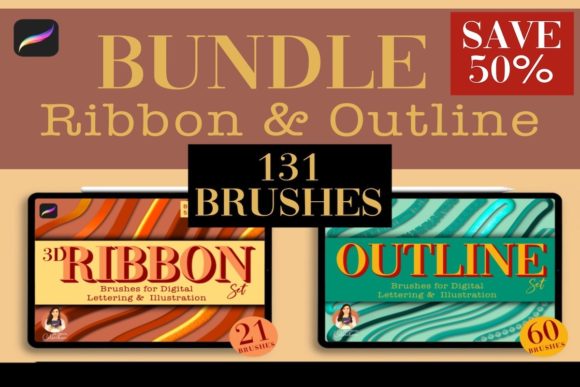
The first component of this bundle is the Ribbon Set, which includes 21 Brushes and 50 Stamps. Ribbons are notoriously difficult to draw manually. Achieving the correct perspective, flow, and shading requires a deep understanding of form and light. These pre-made assets bypass that technical hurdle, allowing you to focus on composition rather than construction.
- Brushes: The 21 ribbon brushes are designed for dynamic strokes. They allow you to paint flowing ribbons that react naturally to your Apple Pencil pressure, creating organic curves and folds instantly.
- Stamps: The 50 stamps are perfect for static decorative elements. Whether you need a bow for a gift illustration, a banner for a logo, or a decorative border for a journal entry, these high-resolution stamps provide instant detail.
All these assets are contained within a single .brushset file, making installation seamless. Once imported, they appear in your Procreate brush library, ready for immediate use.
The Outline Set: Structure and Definition
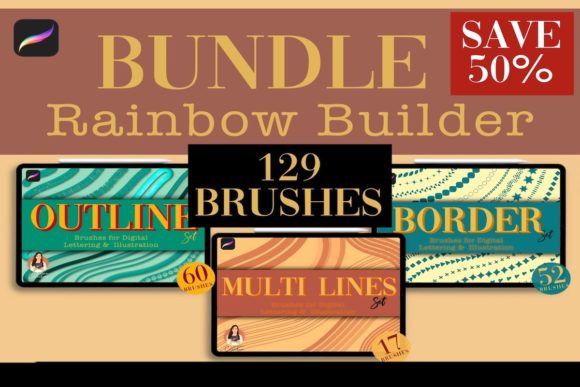
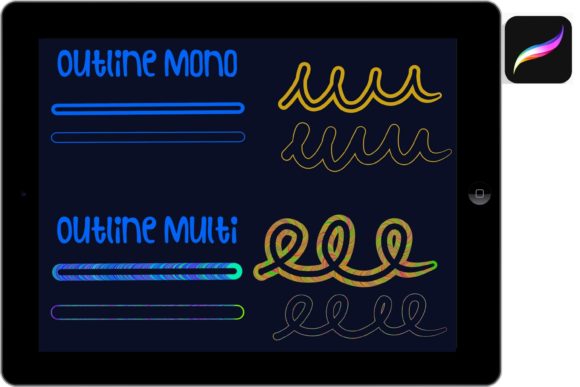
While ribbons add decoration, outlines provide structure. The second part of the bundle features 60 Outline Brushes. In modern digital illustration, line quality defines the style. Whether you are aiming for a sketchy, hand-drawn look or a clean, vector-like finish, having a diverse range of outline tools is essential.
These 60 brushes vary in texture, weight, and opacity. Some may offer a rough, charcoal-like edge for a rustic feel, while others provide smooth, consistent lines ideal for comic book styles or technical illustrations. This variety ensures that you are not locked into a single aesthetic, giving you the flexibility to adapt the bundle to various project requirements.
Technical Requirements and Compatibility
Before purchasing any digital tool, it is vital to ensure it works with your existing hardware and software ecosystem. The 131 Ribbon and Outline Procreate Bundle is built exclusively for the Procreate app. It requires Procreate App version 5 or higher. This ensures that the brushes leverage the latest engine improvements in Procreate, such as improved streamline features and pressure sensitivity algorithms.
It is important to note what this bundle is not compatible with. These files are not compatible with Photoshop or Illustrator. The .brushset format is proprietary to Procreate. If you are a multi-platform artist who switches between Adobe Creative Cloud and Procreate, you will need to keep this limitation in mind. However, for those fully invested in the iPad illustration workflow, this specialization ensures optimal performance and stability.
Practical Applications in Modern Workflows
How does this bundle fit into real-world projects? The versatility of the 131 Ribbon and Outline Procreate Bundle makes it suitable for a wide array of industries and creative pursuits.
Graphic Design and Branding
Designers often need quick mockups for logos, badges, and emblems. The ribbon stamps can serve as the foundational shape for a vintage-style logo, while the outline brushes can be used to add textural details or frame the design. This significantly reduces the time spent drawing complex geometric shapes from scratch.
Digital Planning and Journaling
The rise of digital planning has created a huge demand for decorative elements. Users of GoodNotes or Notability often import Procreate-created stickers. With this bundle, you can create custom headers, dividers, and decorative corners for your digital planners. The ribbon stamps are particularly popular for marking special dates or highlighting important notes in a visually appealing way.
Illustration and Storytelling
For children’s book illustrators or comic artists, the outline brushes are invaluable. They allow for consistent line weight across multiple pages, maintaining visual coherence. Meanwhile, the ribbon elements can be used for costume details, gift scenes, or fantasy elements like magical scrolls and banners.
Installation and File Management
One of the most user-friendly aspects of this purchase is the delivery method. Upon completing your order, you will receive a download link for a zip file sized at 58.9 MB. This compact size ensures quick downloads even on slower connections, yet it contains all the high-quality data needed for professional results.
Inside the zip file, you will find the contents organized for easy access. Since this is a Digital Product, no physical item will be shipped. This eco-friendly approach also means instant access. Once downloaded, you simply unzip the file on your iPad or computer, transfer the .brushset files to your Procreate app, and you are ready to create.
To get the most out of the bundle, it is recommended to scroll through the preview images provided in the product listing before installation. This helps you familiarize yourself with the specific styles of the 131 brushes and stamps, allowing you to plan your projects more effectively.
Why Invest in Specialized Brush Bundles?
Many beginners ask whether they really need specialized brushes when Procreate comes with a robust default library. The answer lies in specialization and time-saving. Default brushes are generalists; they do everything adequately but nothing exceptionally. Specialized bundles like the 131 Ribbon and Outline Procreate Bundle are engineered for specific tasks.
Consider the time saved by using a ribbon stamp instead of drawing, shading, and highlighting a ribbon manually. That saved time can be reinvested into refining colors, adjusting composition, or taking on more client work. Furthermore, the 20% discount makes this an economically smart choice for artists looking to expand their toolkit without breaking the bank.
Additionally, using high-quality, pre-designed elements can elevate the perceived professionalism of your work. Clean outlines and well-proportioned decorative elements signal attention to detail, which is crucial for building a strong portfolio or satisfying commercial clients.
Final Thoughts on Enhancing Your Digital Artistry
The 131 Ribbon and Outline Procreate Bundle represents a strategic investment for any serious Procreate user. It bridges the gap between technical difficulty and artistic expression, providing tools that are both functional and beautiful. Whether you are designing a wedding invitation, illustrating a fantasy novel, or simply decorating your digital diary, this bundle offers the resources needed to bring your vision to life with ease.
By understanding the specific contents—21 ribbon brushes, 50 ribbon stamps, and 60 outline brushes—you can better integrate these tools into your daily workflow. Remember to check your software version to ensure compatibility, and take advantage of the current pricing offer. In the competitive landscape of digital art, having the right tools can make all the difference between a good piece and a great one.