Mastering Digital Calligraphy with the Errol Lettering Brush for Procreate
The landscape of digital art has undergone a significant transformation in recent years, shifting from complex desktop software to intuitive, touch-based interfaces that empower creators of all skill levels. At the forefront of this revolution is Procreate, an application that has become synonymous with digital illustration on the iPad. Within this ecosystem, the choice of tools—specifically digital brushes—plays a pivotal role in defining an artist’s style and workflow efficiency. Among the myriad of options available, the Errol Lettering Brush for Procreate stands out as a specialized tool designed to bridge the gap between traditional hand-lettering aesthetics and modern digital convenience.
This brush is not merely a static stamp; it is a dynamic, pressure-sensitive instrument engineered to replicate the nuanced behavior of physical lettering tools. For professionals, hobbyists, and business owners alike, understanding how to leverage such specialized assets can significantly enhance the quality and versatility of their creative output. Whether you are designing intricate wedding invitations or creating bold social media graphics, the right brush can streamline the process while maintaining an organic, handcrafted feel.
The Mechanics of Pressure-Sensitive Outline Design
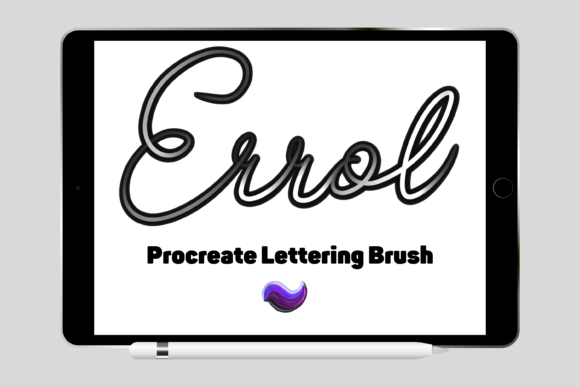
To appreciate the utility of the Errol brush, one must first understand the technical architecture behind high-quality digital lettering tools. Unlike standard round brushes that simply vary in opacity or size based on stylus pressure, a dedicated lettering brush like Errol is calibrated to mimic the specific friction and ink flow of traditional nibs or brush pens. This particular brush pack includes one carefully created lettering brush that functions as a pressure-sensitive outline brush with built-in shadow.
The inclusion of a built-in shadow is a critical feature that saves artists considerable time during the post-processing phase. In traditional digital workflows, adding depth to lettering often requires duplicating layers, offsetting them, and adjusting blur settings to create a drop shadow effect. With the Errol brush, this dimensionality is inherent to the stroke itself. As you apply pressure with your Apple Pencil, the brush responds by thickening the outline and deepening the shadow interaction, creating an immediate sense of three-dimensionality. This allows creators to focus on the rhythm and composition of their lettering rather than getting bogged down in repetitive layer management.
However, it is essential to note the hardware requirements for optimal performance. These files are digital brushes that will only work within the Procreate App. To be able to use them, you will need an Apple Pencil and the Procreate App installed on an iPad Pro. This will not work without this specific combination of hardware and software. The precision of the Apple Pencil is necessary to interpret the subtle pressure variations that drive the brush’s dynamic response, ensuring that each stroke feels natural and responsive.
Versatility Across Creative Industries
The adaptability of the Errol Lettering Brush for Procreate extends far beyond simple sketching. Its design makes it an ideal candidate for a wide array of commercial and personal projects. Because the brush produces clean, scalable vector-like aesthetics (when exported correctly), it serves as a foundational tool for various print-on-demand and digital crafting endeavors.
Greeting Cards and Invitations
One of the most popular applications for this type of brush is in the creation of greeting cards and formal invitations. The built-in shadow effect adds a level of sophistication and elegance that is often sought after in wedding stationery, birthday announcements, and holiday cards. Designers can quickly iterate through different phrases, adjusting the weight and flow of the letters to match the tone of the event. The organic nature of the brush ensures that no two letters look exactly identical, preserving the human touch that mass-produced fonts often lack.
Scrapbooking and Digital Journaling
For enthusiasts of scrapbooking and digital journaling, the Errol brush offers a seamless way to integrate handwritten elements into mixed-media layouts. Whether used for titling pages or adding decorative accents, the brush’s ability to create consistent yet varied strokes helps maintain visual harmony. Users can experiment with color palettes directly within Procreate, testing how different hues interact with the brush’s shadow feature before committing to a final design. This flexibility is particularly valuable for those who wish to create cohesive themes across multiple journal entries or scrapbook spreads.
Wall Art and Home Decor
The rise of printable wall art has opened new avenues for digital artists to monetize their skills. Large-format typography pieces require high-resolution assets that retain clarity when scaled up. The Errol brush, when used at appropriate canvas resolutions, produces crisp outlines that translate well to large prints. Artists can create inspirational quotes, minimalist definitions, or personalized family names, leveraging the brush’s bold character to make a statement in interior design contexts. The built-in shadow adds depth that can mimic the look of raised lettering or neon signs, depending on the color choices and background textures used.
Workflow Integration and Technical Setup
Integrating new tools into an existing workflow requires a clear understanding of the installation and setup process. For those new to importing custom brushes, the procedure is straightforward but requires attention to detail. To download and install the files, you will need a platform to download the files to, such as iCloud, to be able to unzip the files using an app like iZip. Once you have done this, the files will then be imported to Procreate within a named folder.
This organizational step is crucial for maintaining an efficient workspace. By keeping the Errol brush in a dedicated folder, artists can quickly access it alongside other complementary tools without cluttering their default brush library. It is also advisable to test the brush on a separate canvas to familiarize oneself with its pressure curve and sensitivity settings. Adjusting the streamlining feature in Procreate can further refine the smoothness of the strokes, allowing for greater control over sharp corners and sweeping curves.
Furthermore, because this is a digital asset, it offers unparalleled non-destructive editing capabilities. If a letterform does not sit quite right, artists can use the transform tool to adjust its position, rotation, or scale without losing quality. Layers can be manipulated independently, allowing for complex compositions where text interacts with illustrations or photographic backgrounds. This level of control is a significant advantage over traditional media, where mistakes often require starting over from scratch.
Maximizing Value for Print on Demand and Commercial Use
For entrepreneurs and small business owners, the Errol Lettering Brush for Procreate represents a cost-effective solution for product development. In the realm of print on demand, speed and uniqueness are key competitive advantages. Using a specialized brush allows creators to produce original designs rapidly, reducing the time from concept to listing. Whether designing for t-shirts, mugs, or tote bags, the distinct style of the Errol brush can help establish a recognizable brand identity.
It is important to consider the end-use of the designs when working with digital brushes. While the brush creates visually appealing outlines, ensuring that the final export settings match the printer’s requirements is vital for maintaining quality. High DPI settings and appropriate color profiles (such as CMYK for print) should be considered during the final export stage, even though the creation process takes place in an RGB environment. This attention to technical detail ensures that the vibrant colors and sharp shadows created in Procreate translate accurately to physical goods.
In conclusion, the Errol brush is more than just a digital tool; it is a catalyst for creativity that simplifies the complexities of hand-lettering. By combining pressure sensitivity with built-in dimensional effects, it empowers users to create professional-grade typography with ease. From personal DIY projects to commercial print-on-demand ventures, its versatility makes it a valuable addition to any digital artist’s toolkit. As the demand for authentic, handcrafted aesthetics continues to grow in the digital age, tools like the Errol Lettering Brush provide the means to meet that demand efficiently and beautifully.