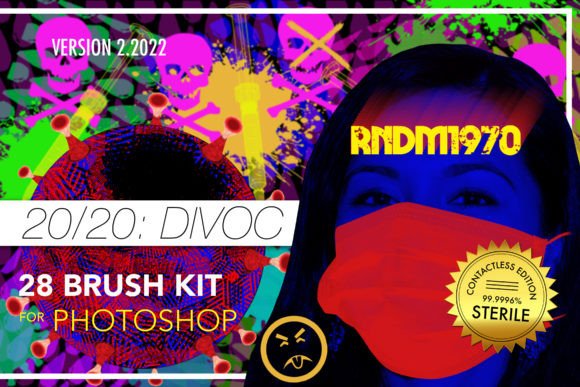
Divoc 28 Brush Kit for Photoshop: A Practical Resource for Digital Creatives
In the rapidly evolving landscape of digital design, finding reliable assets that streamline workflow without compromising quality is a constant challenge. The Divoc 28 Brush Kit for Photoshop emerges as a focused solution for designers, illustrators, and content creators who need versatile texturing tools. Released in response to the shifting creative demands of recent years, this collection offers twenty-eight distinct resources designed to fuel creativity during periods where traditional workflows may have been disrupted. For professionals and hobbyists alike, understanding the technical specifications and practical applications of such a kit is essential before integrating it into a professional pipeline.
Understanding the Composition and Technical Specifications
The core value of any digital brush set lies in its resolution and flexibility. The Divoc kit distinguishes itself by ensuring that all brushes maintain a minimum resolution of 2000 pixels. This specification is critical for modern design work, where outputs range from high-resolution print materials to large-format digital displays. Brushes with lower resolutions often pixelate when scaled, requiring additional time for correction or replacement. By starting at 2000px, this kit ensures that users can apply textures to various project sizes without significant loss of fidelity.
The collection is divided into two primary categories: twenty-one graphic brushes and seven pattern brushes. Additionally, it includes a bonus pattern file, also rendered at 2000px. This structure provides a balanced approach to texture application. Graphic brushes are typically used for stamping specific elements or adding organic details, while pattern brushes allow for continuous texturing along a path or across a selection. The inclusion of both types allows for a more comprehensive toolkit within a single download, reducing the need to source multiple smaller packs for different effects.
All items are delivered in the standard .ABR format for brushes and .PAT for patterns. These are native file formats for Adobe Photoshop, ensuring immediate compatibility without the need for third-party plugins or conversion tools. The ability to endlessly customize these brushes via the Brush Settings panel is perhaps their most significant technical advantage. Users can adjust spacing, angle jitter, size dynamics, and scattering to create unique variations from the base presets. This level of control transforms static assets into dynamic tools that can adapt to specific project requirements.
Practical Applications in Professional Workflows
For marketers and social media managers, the Divoc 28 Brush Kit offers a way to break the monotony of clean, vector-based graphics. Adding subtle grain, distress, or organic overlays can humanize brand visuals, making them feel more tactile and authentic. In an era where audiences are increasingly sensitive to overly polished corporate aesthetics, these brushes provide a method to introduce imperfection and character. For instance, a graphic designer working on a promotional poster might use one of the graphic brushes to add a weathered edge effect, giving the piece a vintage or handcrafted appeal.
Freelance illustrators and concept artists may find the pattern brushes particularly useful for background generation. Instead of painting every detail manually, a pattern brush can quickly establish a consistent texture across large areas, such as fabric, foliage, or architectural surfaces. This efficiency allows artists to focus their energy on focal points and composition rather than repetitive detailing. The high resolution ensures that even when these backgrounds are viewed closely, they retain their structural integrity.
Educators and content creators who produce digital tutorials or educational materials can also benefit from this kit. Visual aids often require clear yet engaging textures to highlight specific areas or separate layers of information. The versatility of the Divoc brushes allows for the creation of custom markers, highlights, and decorative borders that align with specific branding guidelines. Since the brushes are customizable, an educator can tweak the opacity and flow to ensure that text remains readable over textured backgrounds.
Usability and Integration Process
One of the strengths of the Divoc 28 Brush Kit is its straightforward installation process, which lowers the barrier to entry for users who may not be technically inclined. The process begins by unzipping the downloaded archive, which contains the necessary .ABR and .PAT files. Users simply need to double-click the .ABR file to load the brushes into Photoshop. Similarly, double-clicking the .PAT file loads the bonus pattern into the pattern library. Photoshop automatically recognizes these files and integrates them into the respective panels.
This seamless integration is crucial for maintaining workflow momentum. Complex installation procedures involving manual folder navigation or script execution can deter users, especially those working under tight deadlines. By adhering to standard operating system behaviors, the kit respects the user’s time. Once loaded, the brushes appear in the Brush Preset panel, ready for immediate use. The bonus pattern follows the same logic, appearing in the Pattern Picker, allowing for quick access during the design process.
However, usability extends beyond installation. The true test lies in how intuitive the brushes are to manipulate. Because they rely on Photoshop’s native engine, users familiar with basic brush settings will find the learning curve minimal. Those new to digital painting may need to experiment with the Brush Settings panel to unlock the full potential of the kit. Adjusting parameters like "Shape Dynamics" or "Transfer" can significantly alter the output, turning a simple stamp into a complex, varied stroke. This flexibility is a double-edged sword; it offers power but requires a basic understanding of Photoshop’s mechanics to utilize effectively.
Evaluating Quality and Long-Term Value
When assessing the long-term value of the Divoc 28 Brush Kit, consistency and reliability are key factors. The uniform high resolution across all twenty-eight items ensures that users do not encounter unexpected quality drops when switching between brushes. This consistency is vital for professional projects where uniformity in texture quality contributes to the overall polish of the final piece. Unlike free resource packs that often vary wildly in quality and resolution, this curated set maintains a standard that supports professional deliverables.
The kit’s limitation lies in its specificity. With only twenty-eight brushes, it is not a comprehensive library for every possible artistic style. It is best viewed as a specialized toolset rather than an all-encompassing solution. Designers looking for highly specific niche effects, such as watercolor splatters or hyper-realistic hair strands, may need to supplement this kit with other resources. However, for general texturing, grunge effects, and organic detailing, it provides a solid foundation. The value is enhanced by the bonus pattern, which adds extra utility without increasing the complexity of the package.
For small business owners and entrepreneurs managing their own marketing materials, the kit offers a cost-effective way to elevate visual content. Instead of hiring a designer for every minor adjustment, having a reliable set of high-quality brushes allows for in-house experimentation and refinement. The ability to customize means that the same brush can serve multiple purposes across different campaigns, maximizing the return on investment.
Who Should Consider This Kit?
The Divoc 28 Brush Kit for Photoshop is ideally suited for intermediate to advanced Photoshop users who understand the importance of resolution and customization. It is particularly beneficial for:
- Graphic Designers: Who need quick, high-quality textures for print and digital layouts.
- Digital Illustrators: Looking for efficient ways to add depth and detail to their artwork.
- Social Media Managers: Seeking to create distinctive, textured visuals that stand out in crowded feeds.
- Educators and Bloggers: Who require engaging visual elements for instructional content.
It may be less suitable for complete beginners who have not yet mastered the basics of Photoshop’s brush engine, as they might struggle to leverage the customization features. Additionally, professionals requiring highly specialized or industry-specific textures may find the selection too limited for their exclusive needs.
In conclusion, the Divoc 28 Brush Kit represents a thoughtful addition to a digital artist’s toolkit. Its emphasis on high resolution, native compatibility, and customization options makes it a practical choice for a wide range of creative professionals. While it is not a universal solution for every texturing need, its quality and ease of use provide significant value for those looking to enhance their digital projects with organic, high-fidelity details.