Unlocking Whimsy: A Deep Dive into the Procreate Magical Illustration Toolkit
The landscape of digital art has shifted dramatically in recent years, moving from complex, desktop-bound software to intuitive, portable applications that empower creators to work from anywhere. At the forefront of this revolution is Procreate, an app that has become synonymous with modern digital illustration on the iPad. However, the true power of any digital canvas lies not just in the software itself, but in the tools used to populate it. This is where specialized asset packs, such as the Procreate Magical Illustration Toolkit, transform a standard drawing experience into a professional-grade workflow capable of producing textured, sparkling, and deeply impressive artwork.
For artists, designers, and hobbyists alike, understanding the utility and technical requirements of these digital assets is crucial. These instant download hand-drawn created digital brushes are perfect for DIY projects, whether this be for continued digital crafting or for printed goods. The versatility of such a toolkit extends far beyond simple sketching, offering a comprehensive suite of resources that bridge the gap between traditional media aesthetics and digital efficiency.
The Composition of a Comprehensive Brush Pack
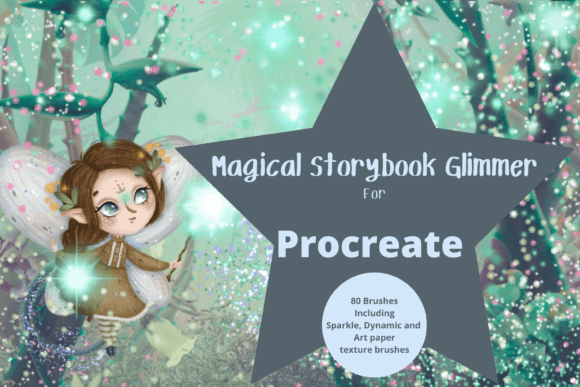
When evaluating a digital art resource, quantity must always be balanced with quality. The Procreate Magical Illustration Toolkit distinguishes itself by containing 80 unique individual, pressure-sensitive digital brushes. This number is significant because it provides a vast palette of options without overwhelming the user with redundant variations. Each brush is engineered to respond dynamically to the Apple Pencil, ensuring that every stroke feels organic and responsive.
The collection includes a diverse range of styles, specifically curated to cover the most sought-after textures in contemporary illustration:
- Multi-tonal brushes: These allow for complex color blending within a single stroke, mimicking the behavior of watercolors or alcohol markers.
- Textured brushes: Ideal for adding grit, grain, and depth to flat colors, preventing digital art from looking too sterile or polished.
- Painterly brushes: Designed to replicate the thick, impasto feel of oil or acrylic paints, providing a tactile visual weight to illustrations.
- Paper brushes: These simulate various paper grains, allowing artists to create backgrounds that look like high-quality cardstock or rough watercolor paper.
All brushes can be resized and recolored to your liking, offering infinite customization. This flexibility ensures that the toolkit remains relevant regardless of the specific style an artist is pursuing, from minimalist line art to dense, layered compositions.
Technical Prerequisites and Installation Workflow
Before diving into the creative possibilities, it is essential to address the technical ecosystem required to utilize these assets effectively. These files are digital brushes that will only work within the Procreate App. To be able to use them you will need an Apple Pencil and the Procreate App installed on an iPad Pro. This will not work without this. The synergy between the hardware’s pressure sensitivity and the software’s brush engine is what allows for the nuanced control that defines professional digital art.
The installation process, while straightforward, requires a few specific steps that new users should be aware of. To download and install the files you will need a platform to download the files to, such as iCloud, and a program to be able to unzip the files, for example, iZip. Once you have done this, the files will then be imported to Procreate within a named folder. This will be a Procreate file and will automatically populate your brush library upon import.
Understanding this workflow is vital for troubleshooting. Many users encounter issues when attempting to open these files on non-Apple devices or within incompatible software. Recognizing that this is a proprietary ecosystem helps manage expectations and ensures a smooth setup process.
Applications Beyond Digital Canvas
While the primary function of the Procreate Magical Illustration Toolkit is to facilitate digital painting, its value proposition extends significantly into the realm of commercial and personal print applications. The clip art elements generated using these brushes can be used for greetings cards, scrapbooking, invitations, wall art, wrapping paper, print on demand, and much much more. It is however very well suited to creating beautiful whimsical illustrations that resonate with modern consumers.
Consider the growing market for personalized stationery. An artist using these textured, painterly brushes can create wedding invitations that possess the warmth of hand-painted watercolors but offer the precision and editability of vector-like digital layers. Similarly, for those involved in print-on-demand businesses, the ability to quickly generate unique, high-resolution patterns using the paper and multi-tonal brushes can streamline product development for items like tote bags, phone cases, and home decor.
Enhancing Educational and Hobbyist Projects
Educators and hobbyists also find immense value in such toolkits. For teachers creating engaging visual aids, the cute and impressive illustrations possible with this pack can make learning materials more appealing to students. Scrapbookers can integrate digital elements into their physical albums by printing out designs created with the textured brushes, adding a layer of professionalism to handmade gifts. The ease of recoloring means that a single design can be adapted to fit various themes, holidays, or brand colors without starting from scratch.
The Aesthetic Advantage: Texture and Depth
In an era where digital content is abundant, standing out requires a distinct visual voice. One of the primary advantages of the Procreate Magical Illustration Toolkit is its focus on texture. Flat, vector-style graphics have their place, but there is a enduring appeal to artwork that looks touched by human hands. The inclusion of paper and textured brushes allows artists to introduce imperfection and organic variation into their work.
This aesthetic is particularly effective in the genre of whimsical illustration. By combining sparkling effects with painterly strokes, artists can create dreamlike scenes that feel both magical and grounded. The pressure sensitivity of the brushes ensures that these textures are not static overlays but dynamic elements that change based on the speed and force of the stylus. This level of interaction creates a connection between the creator and the tool that is often missing in mouse-based digital art.
Strategic Considerations for Creators
For professionals considering the integration of this toolkit into their workflow, several factors warrant attention. First, the reliance on the iPad Pro and Apple Pencil represents an investment in hardware. However, for many creators, this mobility offers a return on investment by allowing work to happen in studios, cafes, or during travel, breaking the tether to a desktop computer.
Second, the versatility of the 80 brushes means that artists may need to spend time experimenting to find their preferred combinations. It is advisable to create test sheets for each brush type, noting how they interact with different opacity settings and blend modes. This preparation can save significant time during actual client projects.
Finally, understanding the licensing and usage rights associated with digital downloads is important. While these brushes are designed for creating commercial goods like greeting cards and print-on-demand items, artists should always verify the specific terms of service provided by the creator to ensure compliance, especially when selling the resulting artwork.
Conclusion: Elevating Digital Craftsmanship
The Procreate Magical Illustration Toolkit represents more than just a collection of digital files; it is a gateway to a richer, more textured approach to digital art. By providing 80 unique, pressure-sensitive brushes that mimic traditional media, it empowers users to create work that is both technically proficient and emotionally resonant. Whether used for professional commercial projects, educational materials, or personal hobbies, these tools offer the flexibility and quality needed to produce standout illustrations.
As the demand for unique, hand-crafted aesthetics continues to grow in both digital and physical markets, having a reliable set of versatile brushes becomes an invaluable asset. For those willing to navigate the initial setup requirements of the iPad ecosystem, the reward is a limitless canvas where whimsy, texture, and creativity converge seamlessly.