Procreate Botanical Stamps: A Practical Guide to Streamlining Your Digital Art Workflow
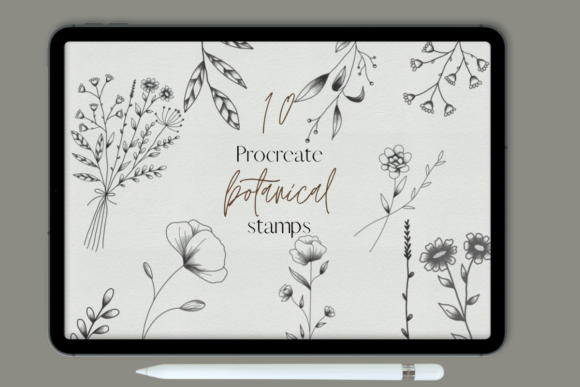
If you have ever spent hours meticulously painting individual leaves, petals, and stems in Procreate, only to realize your wrist is cramping and your deadline is looming, you understand the value of efficiency. Procreate Botanical Stamps are not just a shortcut; they are a strategic tool for digital artists who want to maintain high-quality aesthetics without sacrificing their sanity. This resource comes as a convenient zip file containing ten distinct botanical stamp brushes, designed specifically to integrate seamlessly into your existing library. However, before you dive in, it is crucial to note that these stamps are exclusively compatible with the Procreate app on iPad. They will not work in Photoshop, Clip Studio Paint, or other desktop software.
Understanding the Utility of Botanical Stamps
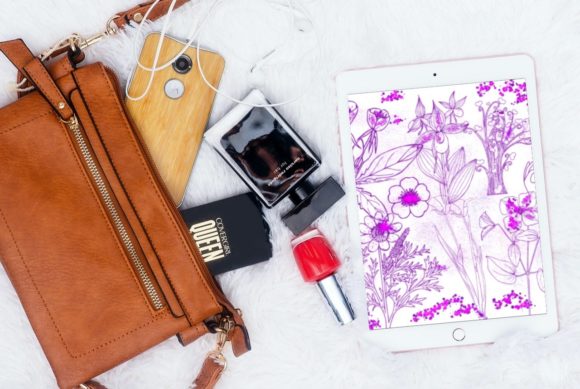
At their core, these brushes are pre-rendered elements that you can stamp onto your canvas with a single tap. Unlike standard texture brushes that require you to paint in a stroke, stamp brushes place a complete image—such as a fern frond, a wildflower cluster, or a delicate vine—instantly. The magic lies in customization. Once stamped, you can resize, rotate, recolor, and adjust the opacity using Procreate’s native tools. This flexibility allows you to create complex, organic compositions that look hand-drawn but take a fraction of the time.
The inclusion of ten unique designs in this pack provides enough variety to avoid repetitive patterns while keeping your brush menu uncluttered. For many creators, this balance is key. Too few options limit creativity, while hundreds of similar brushes lead to decision fatigue. These ten stamps serve as a versatile foundation for various styles, from whimsical children’s book illustrations to sophisticated wedding stationery.
Real-World Applications for Different Creators
The beauty of digital assets like these is their adaptability across different professions and hobbies. Here is how various users can leverage Procreate Botanical Stamps in their daily workflows.
For Small Business Owners and Stationers
If you run an Etsy shop selling digital planners, printable wall art, or custom invitations, time is money. Creating intricate floral borders from scratch for every client request is unsustainable. With these botanical stamps, you can quickly assemble elegant frames for wedding invites or birth announcements. You might use a fern stamp to create a subtle background texture for a planner page, lowering the opacity to ensure text remains readable. The ability to change colors means one set of stamps can serve a rustic autumn brand and a pastel spring collection simply by adjusting the hue slider.
Content Creators and Social Media Managers
Instagram carousels and Pinterest pins thrive on visual appeal. Bloggers and marketers often need to break up text-heavy graphics with engaging visuals. Instead of searching for stock photos that may not match your brand’s color palette, you can stamp botanical elements directly onto your branded backgrounds. Imagine creating a quote graphic where the text is framed by delicate vines. Using these stamps ensures a cohesive look across all your posts, reinforcing your brand identity without requiring advanced illustration skills.
Educators and Journaling Enthusiasts
Teachers creating digital worksheets or homeschooling parents designing lesson plans can use these stamps to make learning materials more inviting. A biology lesson on plant life cycles becomes more engaging when illustrated with clear, beautiful botanical elements. Similarly, fans of digital journaling on apps like GoodNotes (which imports Procreate brushes) can use these stamps to decorate daily logs. Adding a small flower cluster to mark a special occasion or using leaves to separate sections adds a personal, handmade touch to digital notes.
Strategic Considerations Before You Begin
While the convenience of stamp brushes is undeniable, getting the best results requires a shift in mindset. You are not just pasting clipart; you are composing art. Here are practical factors to consider to ensure your work remains professional and original.
- Layer Management: Always stamp on a new layer. This allows you to move, resize, or delete individual elements without affecting the rest of your artwork. Grouping related stamps into folder layers can keep your project organized, especially when dealing with complex compositions.
- Color Harmony: Avoid using the default black or green. Use the color picker to sample hues from your existing palette. Tinting the stamps to match your background or accent colors creates a unified piece rather than a collage of disjointed elements.
- Variation is Key: Do not simply stamp the same element in a straight line. Rotate each stamp slightly, vary the size, and overlap them naturally. Nature is chaotic and organic; your arrangement should reflect that. Flip the canvas horizontally occasionally to check for awkward repetitions.
- Resolution Matters: Ensure your canvas size is appropriate for your final output. If you are designing for print, work at 300 DPI. Stamp brushes are raster-based, meaning they can lose quality if scaled up too much from a small original size. Test a stamp at your maximum intended size to check for pixelation.
Navigating the Technical Setup
Since you receive these Procreate Botanical Stamps in a zip file, the installation process is straightforward but requires attention. Download the zip file to your iPad. Tap on it to unzip the contents, which should reveal the .brushset file. Tap this file, and it will automatically open in Procreate, adding the ten brushes to your current brush set. It is wise to duplicate this set or move it to a dedicated folder within your brush library so you do not accidentally delete or overwrite them during updates.
Remember, compatibility is strictly limited to Procreate. If you switch between apps frequently, you will need to recreate these elements manually in other software or export your Procreate layers as PNGs to use elsewhere. This limitation underscores the importance of mastering the tools within the Apple ecosystem if you choose this route.
Maximizing Creative Outcomes
The true power of these botanical stamps lies in combination. Try layering different stamps to create new shapes. For instance, overlay a leaf stamp with a flower stamp to create a dense bouquet. Use the blending modes in Procreate, such as Multiply or Overlay, to integrate the stamps with textured backgrounds. This technique can make the digital elements feel like they are part of the paper grain, adding depth and realism.
Furthermore, consider the narrative role of the botanicals. In a children’s book, large, whimsical stamps might frame a character, drawing the eye to the action. In a minimalist logo design, a single, small stamp used as a watermark can add sophistication without clutter. The context dictates the application.
Ultimately, Procreate Botanical Stamps are about reclaiming your creative energy. By automating the repetitive task of drawing common natural elements, you free up mental space to focus on composition, storytelling, and color theory. Whether you are a seasoned illustrator looking to speed up your workflow or a hobbyist wanting to add professional flair to your digital journals, these ten brushes offer a practical, versatile solution. They bridge the gap between technical efficiency and artistic expression, allowing you to create beautiful, nature-inspired work with confidence and ease.