Evaluating Procreate Watercolor Brush Stamps for Digital Art
Digital art tools have evolved significantly, allowing artists to replicate traditional media with increasing fidelity. Among these tools, Procreate Watercolor Brush Stamps offer a specific approach to achieving organic, fluid aesthetics within the iPad ecosystem. This set is designed exclusively for the Procreate application, functioning seamlessly with Procreate 5 and previous versions. For artists seeking to integrate the unpredictable beauty of watercolor into their digital workflow without mastering complex wet-on-wet techniques from scratch, this resource provides a structured yet flexible solution.
Understanding the Toolset
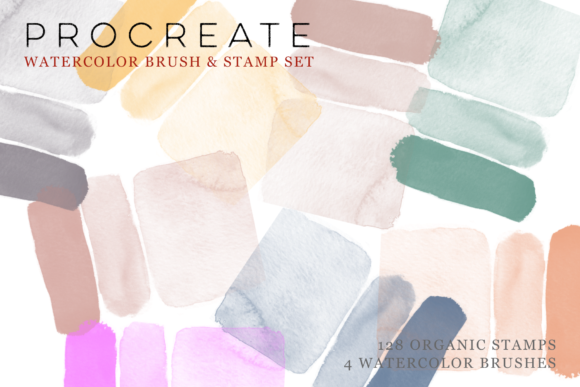
The core of this product lies in its composition: 128 hand-painted brush stamps and four dedicated watercolor paint brushes. Unlike standard brushes that generate marks based on algorithmic pressure sensitivity alone, brush stamps are pre-rendered textures. These are original, hand-painted watercolor marks that have been digitized. The inclusion of four additional paint brushes allows for broader strokes and blending, complementing the static nature of the stamps.
It is crucial to note that these assets are compatible only with Procreate. They will not function in Photoshop, Clip Studio Paint, or other digital art software. This limitation defines the primary audience: iPad users who have already committed to the Procreate platform. For these users, the integration is immediate, requiring no complex installation beyond importing the .brushset file.
Workflow Advantages and Creative Potential
The primary appeal of using Procreate Watercolor Brush Stamps is efficiency. Traditional watercolor painting requires careful management of water-to-pigment ratios, drying times, and paper texture. Digitally replicating this randomness can be time-consuming. By utilizing pre-made stamps, artists can bypass the technical learning curve associated with simulating water flow and pigment dispersion.
The set encourages an additive workflow. Users can create an endless variety of abstract work by combining different stamps. The ability to mix and match, overlay, and apply various colors allows for the construction of beautiful organic watercolor compositions. This method is particularly effective for background creation, texture overlays, and illustrative elements where precise control is less critical than visual atmosphere.
Furthermore, the technical flexibility of Procreate enhances the utility of these stamps. Artists can place brush stamps on separate layers and utilize layer blending modes—such as Multiply, Overlay, or Color Burn—to interact with underlying paintings. This technique creates depth and visual interest, mimicking the way real watercolor pigments settle into paper fibers. It allows for non-destructive editing, meaning mistakes can be corrected easily without ruining the entire piece.
Considerations and Tradeoffs
While the convenience is significant, there are tradeoffs to consider. Because the marks are pre-painted, they lack the dynamic responsiveness of a fully procedural brush engine. A standard watercolor brush might change its behavior drastically based on tilt, speed, and pressure. In contrast, a stamp is a static image. While you can resize and rotate it, the internal texture remains constant. This can lead to repetition if the same stamps are used frequently without variation in color, opacity, or blending modes.
Artists who prioritize hyper-realism may find the limitations of stamp-based workflows restrictive. The "hand-painted" nature ensures authenticity, but it also means the variety is finite. With 128 stamps, there is considerable diversity, but heavy users may eventually recognize recurring patterns. To mitigate this, successful implementation requires a strategic approach to layering and color variation rather than relying on single-stamp placements.
Another consideration is the learning curve associated with layer management. To achieve the best results, users must understand how blending modes affect color interaction. Without this knowledge, the stamps may appear flat or pasted on, rather than integrated into the artwork. Therefore, this tool is most effective for users who already possess intermediate skills in digital layering and compositing.
Ideal Use Cases
This brush set is a strong fit for several specific scenarios:
- Abstract and Expressive Art: Artists focusing on mood and texture over precise line work will benefit from the organic shapes provided by the stamps.
- Background Creation: Illustrators often struggle with creating engaging, non-distracting backgrounds. These stamps allow for rapid generation of textured backdrops that can be toned down via opacity adjustments.
- Hybrid Media Projects: Designers combining photography with digital painting can use these stamps to add a hand-crafted feel to digital composites, bridging the gap between photo-realism and illustration.
- Rapid Prototyping: Concept artists needing to quickly establish a watercolor aesthetic for client presentations can save hours by using pre-made textures instead of painting them from scratch.
When to Consider Alternatives
Despite its benefits, Procreate Watercolor Brush Stamps may not be the optimal choice for everyone. Artists who prefer total control over every pixel and stroke might find standard procedural watercolor brushes more suitable. These brushes allow for continuous adjustment of flow, wetness, and granulation in real-time, offering a more traditional painting experience.
Additionally, if your workflow involves multiple software platforms, investing in a Procreate-exclusive tool may limit your flexibility. Cross-platform brush sets or vector-based watercolor assets might offer better long-term value for designers who switch between iPad and desktop environments.
Beginners who are still learning the fundamentals of digital art might also find the layer-heavy workflow required to maximize these stamps overwhelming. In such cases, simpler all-in-one watercolor brushes that handle blending automatically might provide a smoother learning experience.
Making the Decision
Choosing whether to incorporate Procreate Watercolor Brush Stamps into your toolkit depends on your artistic goals and current skill level. If you value speed, organic texture, and the ability to create complex layered effects without extensive manual painting, this set offers a compelling advantage. The inclusion of both stamps and paint brushes provides a balanced approach, allowing for both detailed texturing and broader strokes.
However, if your priority is realistic simulation of fluid dynamics or if you require cross-platform compatibility, you may need to look elsewhere. Evaluate your current projects: do you spend excessive time trying to mimic watercolor textures? If so, these stamps can streamline your process. Do you prefer the meditative aspect of building up paint digitally? Then a procedural brush might serve you better.
Ultimately, this tool serves as a bridge between traditional aesthetics and digital efficiency. By understanding its strengths in layering and abstraction, and acknowledging its limitations in dynamic responsiveness, artists can make an informed decision that aligns with their creative workflow.