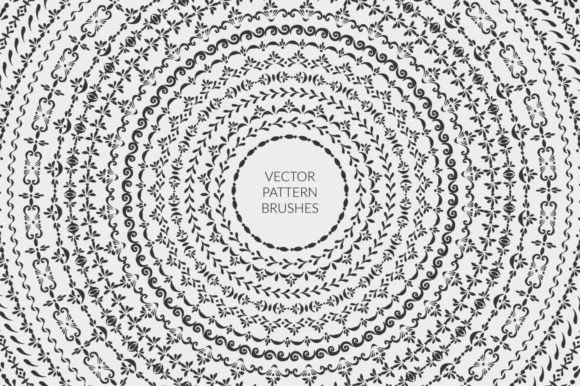
Elevate Designs with Pattern Brush and Decor Set
In the fast-paced world of digital design, efficiency often battles with originality. Designers, marketers, and small business owners constantly seek tools that bridge this gap, allowing for rapid production without sacrificing the handcrafted aesthetic that audiences crave. This is where a robust Pattern Brush and Decor Set becomes an indispensable asset. Unlike standard static graphics, pattern brushes offer dynamic flexibility, adapting seamlessly to any shape or path while maintaining visual consistency. Whether you are crafting elegant wedding invitations, professional certificates, or eye-catching social media labels, understanding how to leverage these ornamental borders can transform your workflow and elevate the perceived value of your creative output.
The Power of Dynamic Ornamentation
Traditional clipart often feels rigid. You place it, and it stays exactly as it was drawn. If you need to wrap a border around a circular badge or stretch a divider across a wide header, standard images distort, pixelate, or lose their proportion. A well-constructed pattern brush solves this by defining a repeating tile that stretches or repeats along a vector path. The result is a seamless, scalable ornament that looks intentional and polished, regardless of the dimensions.
The specific collection featuring rough hand-drawn elements and strokes brings a human touch to digital formats. In an era dominated by sleek, corporate minimalism, organic textures stand out. These imperfections—slight variations in line weight, textured edges, and artistic irregularities—convey warmth and authenticity. For brands focusing on artisanal products, wellness, education, or personal services, this aesthetic builds immediate trust and connection with the audience.
Versatility Across Shapes and Formats
One of the most compelling features of this decor set is its adaptability. The inclusion of twenty-two borders designed specifically for round shapes, paths, and curves opens up a myriad of possibilities. Imagine creating a circular seal for a coffee bag label, where the text sits in the center and the ornamental brush forms a perfect ring around it. Or consider a wavy divider for a blog post header that flows naturally rather than cutting across the page with a harsh straight line.
Equally important are the fifteen borders equipped with corner elements. Square and rectangular shapes dominate print and web design, from business cards to website banners. Standard borders often fail at the corners, leaving awkward gaps or mismatched joints. Corner-aware pattern brushes automatically adjust the miter or join points, ensuring that every angle looks crisp and continuous. This technical precision saves hours of manual adjustment in post-production, allowing designers to focus on layout and typography rather than fixing broken vectors.
Practical Applications for Various Creators
Different professionals can harness this toolkit in unique ways to meet their specific goals:
- Wedding and Event Planners: Use the delicate, hand-drawn strokes to frame menu cards, save-the-dates, and seating charts. The ability to change colors easily means you can match the exact palette of the event without needing complex recoloring tools.
- Educators and Publishers: Create engaging worksheets, certificates of achievement, and chapter headers. The rough texture adds a friendly, approachable feel that reduces anxiety for students while maintaining a professional structure.
- Small Business Owners: Design product labels, packaging inserts, and thank-you notes. Consistent branding is key, and using the same set of dividers and borders across all touchpoints creates a cohesive brand identity.
- Social Media Managers: Quickly generate story templates and post frames. By applying a border to a simple square path, you can create a branded background for quotes or announcements in seconds.
Mastering the Workflow in Adobe Illustrator
To get the most out of these assets, a basic understanding of Adobe Illustrator’s brush engine is essential. The process is intuitive but powerful. Upon opening the provided AI or EPS files, navigate to Window > Brushes. Here, you will find the full library of pattern brushes ready for use. The artwork visible on the artboard serves merely as a preview; the real magic happens when you apply these brushes to your own paths.
Start by drawing a path using the Pen Tool, Pencil Tool, or Shape Tools. It could be a simple straight line, a complex spiral, or a custom polygon. With the path selected, simply click on the desired brush in the panel. Instantly, your plain line transforms into an intricate, hand-drawn border. From there, you can refine the appearance using the Stroke panel. Adjust the weight to scale the thickness of the elements, or use the "Stretch to Fit" option if you need the pattern to compress or expand to fit a specific length without repeating the motif too frequently.
For long-term efficiency, save your favorite brushes into a custom library. This ensures that your signature decorative styles are always one click away, regardless of the project file you are working on. This organizational habit is crucial for freelancers and agencies managing multiple clients, as it maintains consistency and speeds up the initial design phase.
Customization and Creative Freedom
While the black versions included in the set are versatile and classic, they are just the starting point. Because these are vector-based pattern brushes, you have complete control over color and opacity. You can sample colors directly from a client’s logo or a mood board to ensure perfect harmony. Furthermore, you can layer multiple brushes. For instance, apply a thick, rough border as the base, then overlay a thinner, more delicate stroke to add depth and complexity.
The set also includes standalone decor elements, headers, and dividers. These non-brush assets complement the pattern brushes perfectly. Use them to break up text blocks, highlight key information, or add flourish to empty spaces. Combining the dynamic nature of the brushes with the static precision of the decor elements allows for balanced compositions that guide the viewer’s eye through the design logically and aesthetically.
Maintaining Clarity and Consistency
When using ornamental elements, it is easy to overdesign. The key to effective use lies in restraint and consistency. Choose one or two border styles per project to maintain a unified look. Ensure that the weight of the brush complements the typography; a heavy, bold font pairs well with thicker strokes, while light, serif fonts benefit from finer, more delicate lines.
Always check your designs at actual print size or on the intended device screen. What looks balanced on a large monitor might appear cluttered on a mobile phone or a small business card. Use the scalability of the vector format to test different sizes quickly. Remember, the goal of decoration is to enhance the message, not distract from it. By keeping the layout clean and letting the hand-drawn quality of the Pattern Brush and Decor Set add subtle character, you create designs that are both beautiful and functional.
Ultimately, integrating these tools into your creative arsenal is about more than just saving time. It is about expanding your visual vocabulary. With the ability to apply seamless, ornamental borders to any path, circle, or corner, you gain the freedom to experiment with layouts that were previously too tedious to execute. Embrace the rough, organic charm of hand-drawn strokes, and let your designs speak with a voice that is both professional and distinctly human.